FOR MACOS 14+ SONOMA & SEQUOIA · 100% PRIVATE

A plant companion on your menu bar for your clipboard & screenshots.

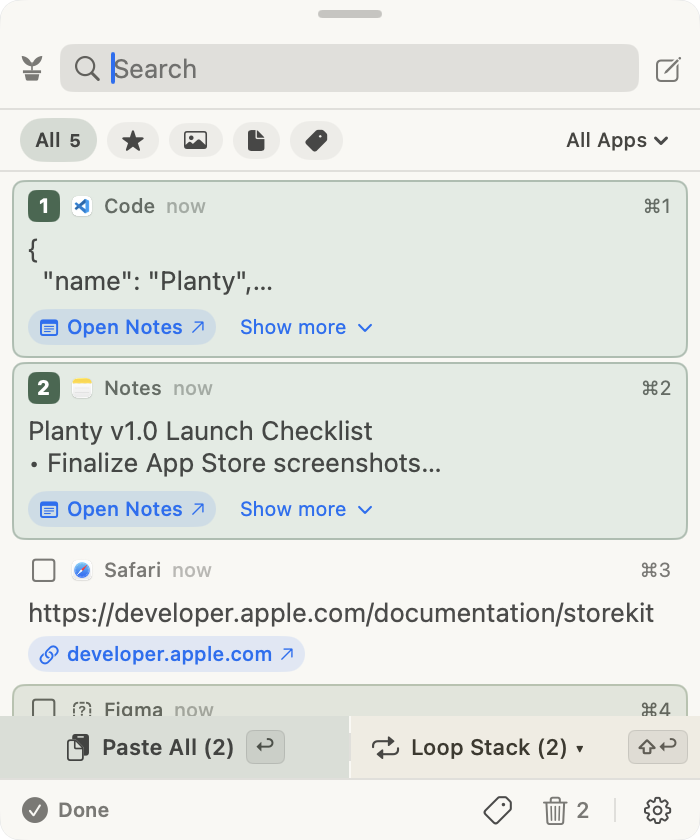
Collects past copy items and screenshots automatically—making you free to search, preview, and reuse your clipboard anytime.

macOS 14.0 Sonoma & macOS 15 Sequoia (Apple Silicon & Intel) · Coming Soon to Mac App Store

Planty
🪴 Planty
🔍
All (12)TextScreenshotsNotes★ Starred
1

const theme = 'plantyCream';

VS Code · Just now · 34 chars

2
ScreenshotCleanShot 2026-08-31 14.15.png

Desktop · 2m ago · 1440 × 900

⌘2
3

💡 Cozy botanical plant companion for menu bar clipboard.

Quick Note · 15m ago

⌘3
Press or ⌘1..9 to pasteSpace Preview
🪴 Planty WidgetmacOS Desktop
Planty Botanical Desk Companion
Calm Desk CompanionGrows with your clips
Screenshot Capture & Markup

Missed dragging that macOS screenshot in time?

Take your time. Planty catches every screenshot automatically, lets you annotate in seconds, and keeps your desktop pristine.

The Native Rush

The 4-Second Panic

macOS floating thumbnails vanish to your desktop in 4 seconds. If you were switching tabs, you have to minimize windows and search through Desktop files.

macos-thumbnail-timeout.mp4GIF / MP4
Video Demo: Floating thumbnail expires & vanishes
With Planty

Zero Rush. Ready Whenever You Are.

Planty catches the capture instantly into your menu bar. Switch apps leisurely, annotate or crop, then drag directly into Slack, Figma, or Notion.

planty-drag-to-slack.mp460 FPS DEMO
Video Demo: Dragging screenshot directly from menu bar
Built-in Editor

Annotate & Redact in seconds.

Highlight key details, draw arrows, add step badges, or blur sensitive data before sharing.

planty-annotation-workflow.mp4
Active
Video Placeholder · 4K 60FPS
Interactive Annotation Demo
Highlighted focal metric with smooth arrow
Drop Screen Studio recording or GIF

Zero Rush Drag & Drop

No more racing against the clock. Your screenshots stay safe in your menu bar until you need them.

Instant Annotations

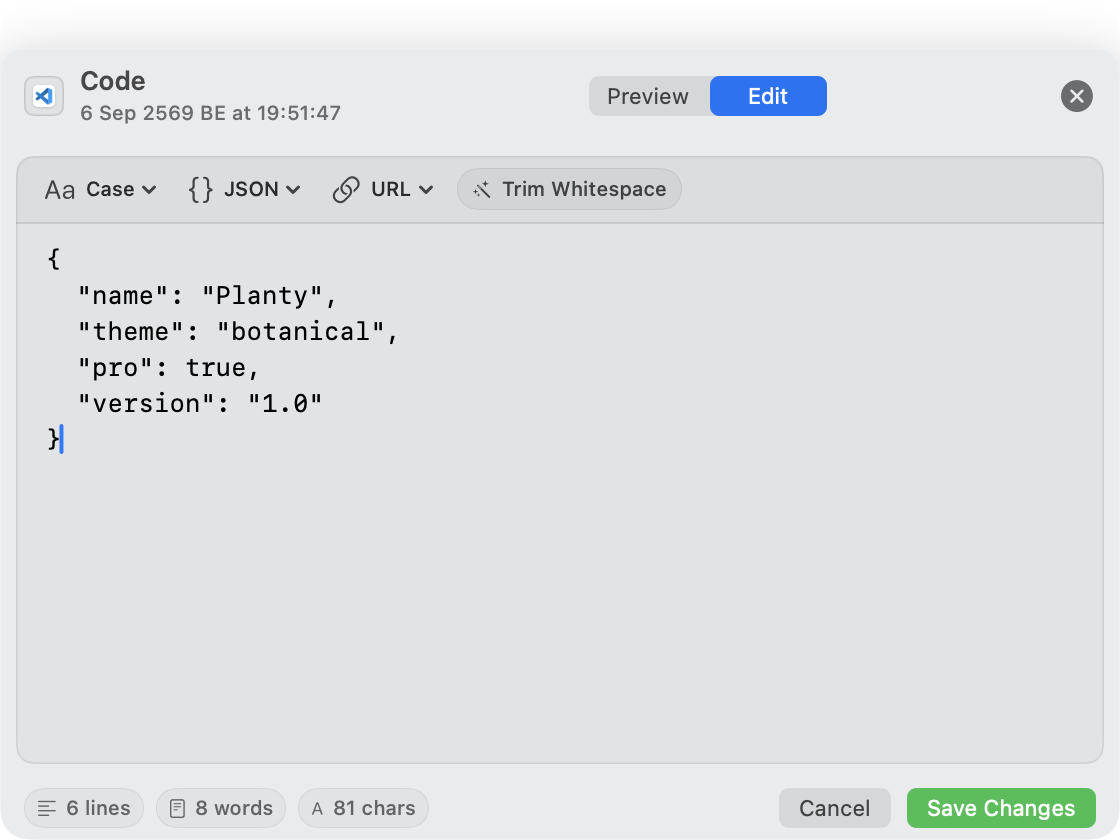
Add arrows, circles, text callouts, step counters, and privacy pixelate blur right from the popover.

Self-Cleaning Desktop

Once you drag your screenshot into an app, Planty automatically sends the temporary desktop file to Trash.

Carefully Crafted

Everything your clipboard needed. Nothing it didn't.

Lightweight, fast, and engineered with calm botanical aesthetics.

Instant Recall

Smart Clipboard History

Automatically captures copied text, formatted code, links, and colors. Search instantly with fuzzy filtering.

Zero Desktop Clutter

Direct Screenshot Watcher

Monitors new screen captures automatically. Drag them straight into your apps or move to Trash once done.

Frictionless Notes

Quick Thought Notes

Compose quick reminders right in the menu bar popover with Return to save. No need to open heavy note apps.

Batch Flow

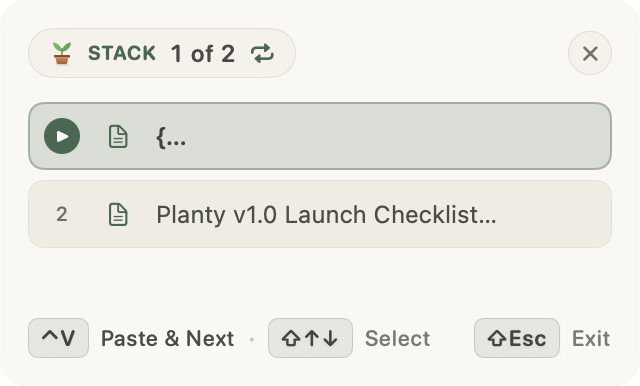
Sequential Paste Stack

Copy multiple items across different apps, then paste them in order one by one with a lightweight HUD.

Calm Workspace

Decorative Desk Plant Widget

A peaceful botanical desk widget that adds calm to your desktop workspace with zero distractions.

Local Only

100% Private & Sandboxed

Stored strictly on your local disk (`~/Library/Application Support/planty/`). Ignores password managers and never connects to any server.

Keyboard First

Fly with your keyboard.

Never take your hands off the home row.

Toggle Planty Popover⌘ ⇧ V
Quick Paste Item 1–9⌘ 1 … 9
Quick Look PreviewSpace
Favorite / Pin Item⌘ S
Delete Item
Filter by Text / Images / Notes⌘ 1 / 2 / 3
🛡️

Your clipboard never leaves your Mac.

Password managers like 1Password and Apple Keychain are strictly ignored. There are zero accounts, no cloud sync, and no analytics SDKs. All data resides safely in ~/Library/Application Support/planty/.

Got Questions?

Frequently Asked Questions

Where is my clipboard data stored?+

All clippings, screenshots, and notes are stored strictly on your local Mac disk in `~/Library/Application Support/planty/`. Planty has no analytics, no external servers, and zero cloud synchronization.

How does Planty protect my passwords and sensitive data?+

Planty respects standard macOS pasteboard flags (such as `org.nspasteboard.ConcealedType` and transient types). Password managers like 1Password, Bitwarden, Apple Keychain, and KeePass are automatically ignored and never saved to history.

Does Planty support Apple Silicon (M1/M2/M3/M4) & Intel?+

Yes! Planty is a native Universal binary engineered specifically for macOS 14 Sonoma and macOS 15 Sequoia, running with native efficiency on Apple Silicon and Intel Macs.

When is Planty launching on the Mac App Store?+

Planty is launching soon on the Mac App Store. Join the waiting list to get notified the moment it goes live.

Planty: Clipboard & Screenshot

Ready to bring calm to your clipboard?

Join the waiting list for Planty on the Mac App Store. A gentle plant companion collecting your past copy items and screenshots.

macOS 14.0 Sonoma & macOS 15 Sequoia (Apple Silicon & Intel)